Inbox zero is this concept that completely insane people like to tout on podcasts (or at least it was in the 2000s). I remember reading and listening to people lay out their perfect email triage processes, or how to hire VAs to create intricate folder systems organizing all their stuff perfectly.
Then i’d look at my 92k sized inbox, feel a little bad about myself and move on with my life.
Twice in my 20+ years building and selling tech did I really commit to ‘inbox zero’ and twice I failed in ways that would shame even the most neurodivergent entrepreneur.
Here are the big problems with inbox systems:
it’s unrealistic to think you will get to everything in a timeline fashion
life doesn’t file into a few folders (which means you need a lot of folders)
Even a hired VA is not a machine (and VAs don’t usually follow you form venture to venture, your personal + corporate job etc.) VAs are al luxury, and should be cursed with a gap between great, trained assistants your inbox will balloon faster than those carnival water gun games.
But with LLMs there is hope.
Some judgement that an assisntant would have can be communicated and prompted. And the machines never sleep (though they eat tokens).
Why Now
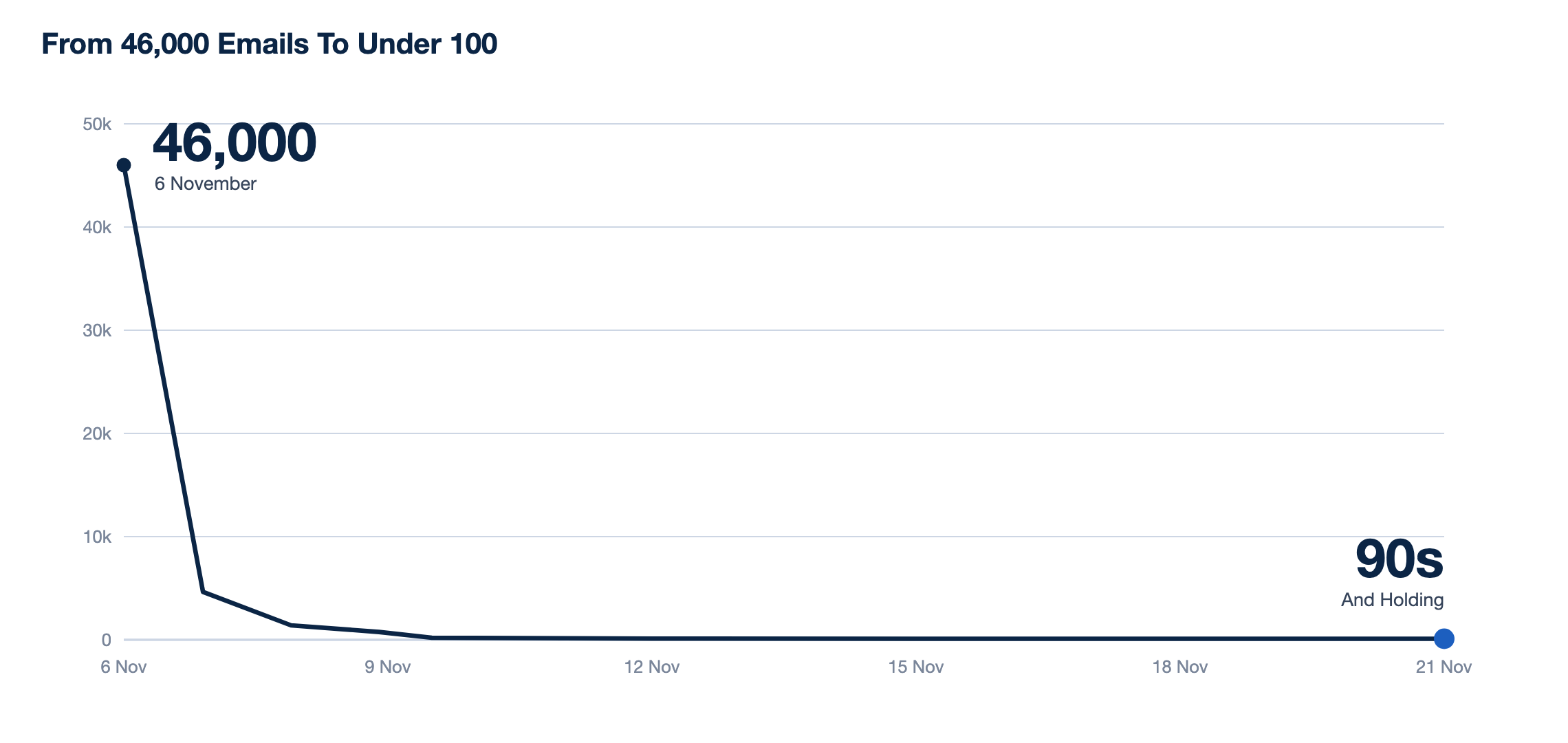
Here is a chart of my inbox size over the past week running this project Inbox Zero-ish.
The catalyst for me is that my email ends up in public places now, as a titled CEO/Founder, in a specific vertical I get 10+ cold outreach emails a day. For capital, for loans, for agencies to help our SEO (we don’t need help), for devleopment firms, you get it.
Normally I mark this as spam in a huff (I hate impersonal outreach, and AI generic outreach is even more offensive). But what if I had an LLM categorizing these new emails every few minute sand gently moving the offending emails into my archive?
Why Zero-ish?
I think the inbox can be a great queue of prioritization for a busy person. But it has to be boiled down to “If it’s still in my inbox its important”. Everythign else must be stripped away.
If you get to zero, then you dont’ have anything to act on, which is nonsense. Anyone building a company can’t act on all the things instantly, and if they “file it for later”, it’ll be forgotten forever. There has to be a middleground, and that’s the “ish”.
The Ideal Founder Inbox
Founders inboxes are a vertiable battleground for attention. Emergencies, VC relationships, mentors, sales, customers, and a team crying for attention. The hard part is deciding what should stay and be acted on (now or eventually), and then filing the rest away neatly in case you need to find it later.
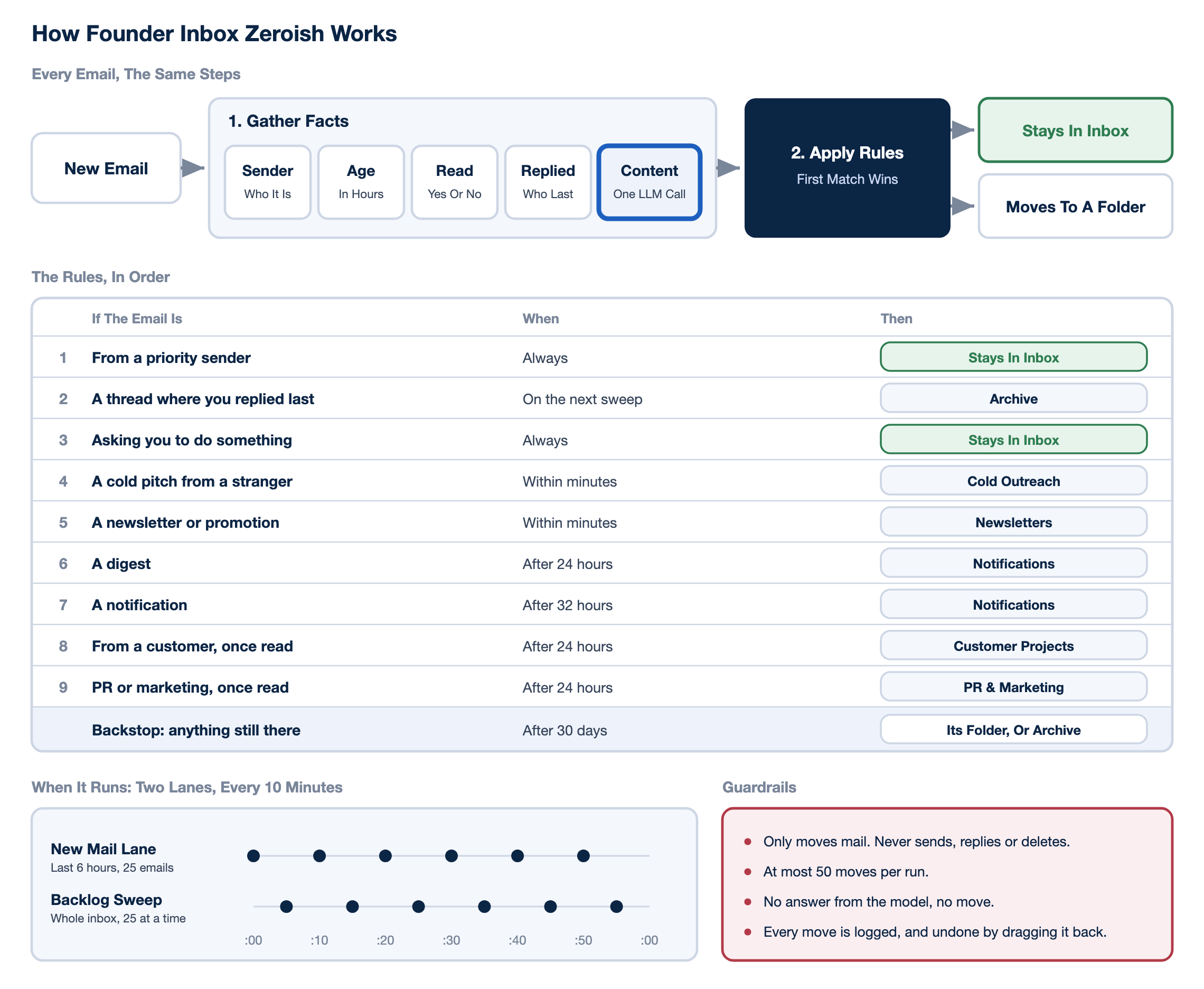
Step 1. Remove the garbage
Cold email outreach is painful for most founders. You need to be publicly available/accessible (and likely listed on Crunchbase and Pitchbook), but people cleary scrape these lists and hammer them repeatedly. No amount of unsubscribes/spam reporting stops the flow of terrible cold emails for most public facing founders.
These are easy to spot (if it’s easy to write with AI, it’s even easier to categorize with AI!), and should be removed upon arrival.
Step 3. File the Notifications
There are plenty of emails I’m glad to receive, I read them and depending on what they are I act on them that same day (alerts, newsletters etc.). But after a day or two, a newsletter or system alert is not going to be useful or move the needle for me.
These types of emails that are timely can simply get filed away (out of the inbox) after some time period you set.
What if all my emails older than a day or so were filed away neatly, available if i need to search them or find them, but not cluttering my main inbox.
The founder inbox is a battle ground of interruptions and delayed decisions. And the more we sell, the more success we have, the worse it gets.
I figure it’s time for a re-imagining of the inbox, or at least a bandage of the floodgates

So what is the point of the inbox? I think most founders can break down eamisl they receive into a few things:
Hopeless and horrible cold outreach
Sales and prospect related emails
Customer and project related emails
Internal emails (HR, PR nad marketing etc.)
Notifications from your 95 different systems and saas products you glued together.
Newsletters you optimistically subscribed to but rarely read
Well it turns out that even small LLMs are getting pretty darn good at deciphering these subtleties.

Step 4. Get Real and Archive
Your brain (mine at least) is not ever going to retain and process emails from longer than a few weeks ago. In my world, if I don’t get to something in a few weeks it’s not likely I’ll find it in my inbox and remember to do it.
I have a lot of aspirational emails in my inbox. Things I would like to believe I’ll get to at some point (and rarely do).
On the other hand, if I do remember something from a long time ago (hey, it happens), I’ll just search for those emails and find them. No need to live in the inbox.
Because of this, I added a more general archival feature. If an email doesn’t match any of our standard 1-2 filing rules AND sits in the inbox for more than 30 days, we give up on it and just archive it.
This keeps the emails searchable, but also makes my ‘inbox’ a manageable scroll permanently.
Creating Inbox Rules
And what of the rules? One of my failed attempts was to go crazy building articulate rules over time to manage and ship all my emails around. This of course I never kept up with. The senders and formats change, and the rules become obsolete. LLMs fix this, they can run basic rules and make calls day in and day out even as the nature of the emails change.
Why this fails on Claude
Claude could do this entire process easily. The problem is usage. I want my inbox scanned repeatedly for junk emails and for them to get removed as the appear. I don’t want to wait until the end of the day to have my inbox cleaned.
So, I need a consistent script running, and a cheap (free) LLM doing the processing.
Fortunately email triage is something even simple models can do. A cheap opesnource model may cost you a few pennies a day depnding on your email traffic. If you run local models like we do that cost is even less.
Inbox Zero-ish
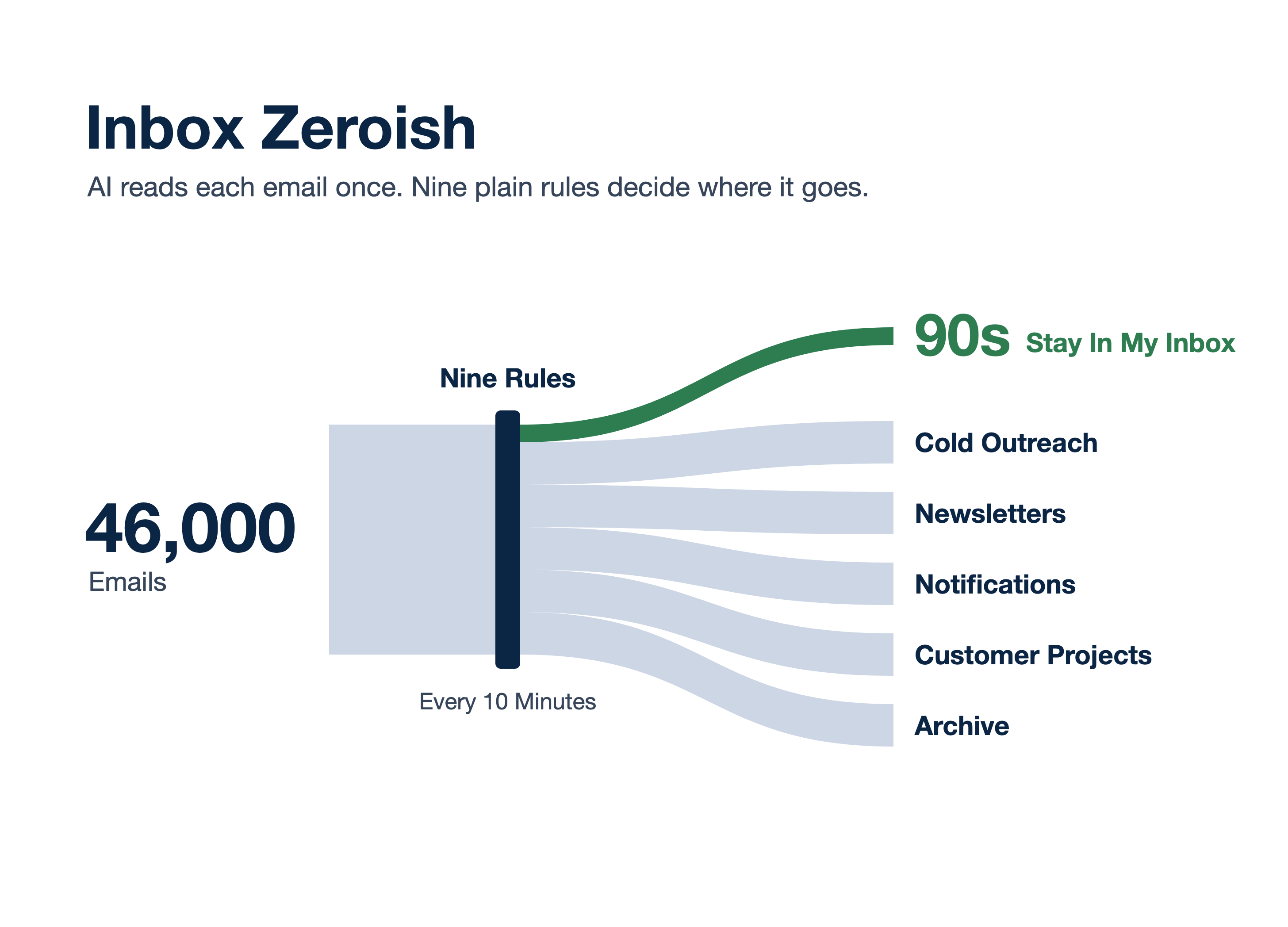
This project did not take long to build, but it’s had a massive impact on my inbox. It took about 1 day of running to take my 46,000 email inbox down to about 100, and it hovers there consistently now.
You just need Microsoft Entra permissions to read your own inbox, and you can get this thing spun and ripping through your inbox. Maybe at some point I’ll throw this up as a hosted connector service, but now it needs to be self-hosted.